

What we do

Your need.
Our technology.

Your backlist, content and knowledge can underpin new businesses. We combine OCR, search and connected assistants to create services you can sell and reduce the cost of producing them.

01 · Connected knowledge · MCP

Connect my content to AI

Publishers · Libraries · Museums

Catalogues, works and contentQuestions answered with source references

MCP connectors bring knowledge and services into AI assistants, in natural language and with the access you choose.

  • Semantic search, relationships and knowledge graphs
  • Passages and answers with source references
  • Access for teachers, researchers and the general public
What is MCP · See examples in ChatGPT ↗

Your knowledge can earn revenue through specialist access. Together we design the service, its audience and its terms of use.

Explore this for my organisation See it in a project
A journey through the processExplore each stage or play the walkthrough.
baiq
SOURCESDocument and context
QUESTION / CONTEXT

Which document contains this idea?

THIS STAGE’S RESULT

Query of authorised sources

Fictional example · natural-language question

Workflow illustration · fictional examples, except identified evidence
01 / 03 · Ask

People start with their need.

The assistant interprets the question and selects available tools to consult sources.

Query of authorised sources
02 / 03 · Connect

MCP brings the source closer.

The protocol connects tools and sources according to defined permissions; retrieval provides evidence to the assistant.

Passage + document + location
baiq
HOW THE PROCESS CONNECTSFrom sources to a grounded answer

How should I store a watercolour?

ORGANISATION CONTENTConservation guidePaper · watercolours · care
MCPFinds the passage
and its reference
RETRIEVED SOURCE

“Store on an acid-free support, away from direct light.”

[1] Conservation guide · p. 12
ASSISTANT SYNTHESIS

Use an acid-free support and keep it away from direct light. [1]

The answer draws on a passage you can check.
Process illustration · fictional example
Workflow illustration · fictional examples, except identified evidence
03 / 03 · Check

Responses lead back to the source.

The assistant prepares the answer from retrieved material. People review references and make decisions.

Answer + sources to check it
Technology prepares and organises. People review and decide.1 / 3
02 · Specialist support

Support and resolve with data

Customer support · Internal help desk · Operations

Issues, guides and authorised recordsPrior analysis and resolution proposals

Agents analyse issues before a person handles them. We connect guides, logs, records and error signals through MCP to prepare diagnosis and proposals using the necessary information, according to team permissions.

  • Prior analysis and proposals when the issue arrives
  • Specialist queries of relevant logs and records
  • Reviewable replies or evidence-based escalation

Less repeated investigation and waiting between teams: an opportunity to handle more enquiries with the same resources and improve service margins.

Explore this for my organisation See it in a project
A journey through the processExplore each stage or play the walkthrough.
baiq
baiqFICTIONAL SCENARIO
“The import does not finish.”DEMO-1044
QUESTION / CONTEXT

“The import does not finish.”

THIS STAGE’S RESULT

Affected job: demo-job-27

Fictional scenario · relevant data only

Workflow illustration · fictional examples, except identified evidence
01 / 04 · Identify

An issue has context.

The affected task and necessary information are identified according to team permissions.

Affected job: demo-job-27
02 / 04 · Retrieve

Authorised sources provide evidence.

MCP connects guides, records and error signals relevant to that issue.

Manifest reader failure
baiq
baiqFICTIONAL SCENARIO
demo-job-27Status: stopped Signal: manifest reader failure Source: authorised record
STARTING WITH

Stopped import + manifest error

THIS STAGE’S RESULT

Bug identified · diagnosis prepared

Analysis distinguishes evidence from proposals.

Workflow illustration · fictional examples, except identified evidence
03 / 04 · Analyse

AI prepares the diagnosis.

The agent checks information and prepares proposals before a person handles the issue.

Bug identified · diagnosis prepared
baiq
baiqFICTIONAL SCENARIO
demo-job-27Status: stopped Signal: manifest reader failure Source: authorised record
STARTING WITH

Processed diagnosis

THIS STAGE’S RESULT
CUSTOMER SUPPORT

Support: explanation and next steps

Diagnosis and proposal to review and communicate.

ENGINEERING

Issue created by the agent DEMO-BUG-027

Engineering: reproduction + expected/observed + evidence

Workflow illustration · fictional examples, except identified evidence
04 / 04 · Orchestrate

Each team receives its part.

Support receives the diagnosis and proposed reply. When a bug is found, the agent directly creates the engineering issue.

Engineering: reproduction + expected/observed + evidence
Technology prepares and organises. People review and decide.1 / 4
03 · Digitisation · OCR

Recover and digitise my collection

Publishers · Libraries · Archives

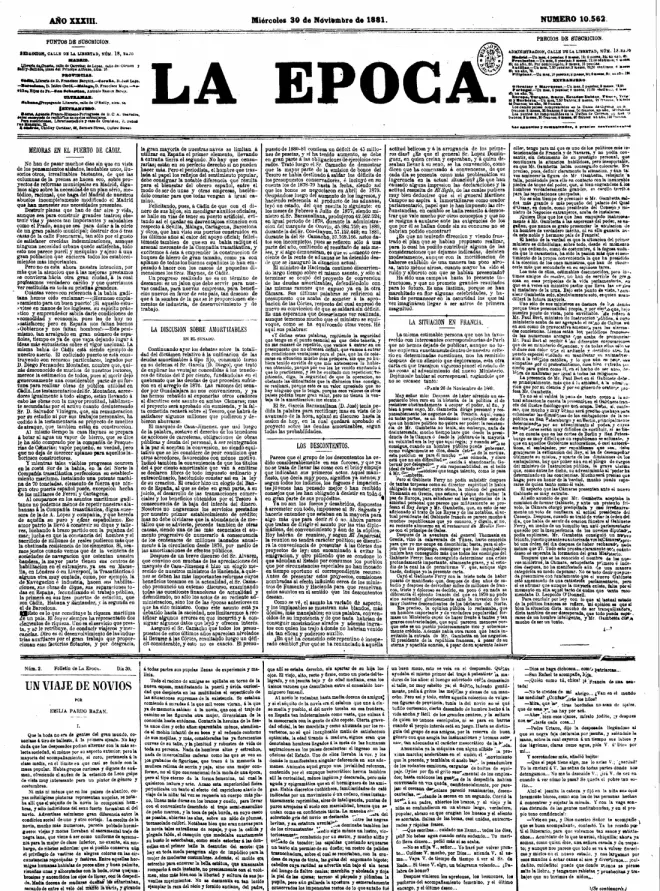
Scans, columns and footnotesStructured text ready for review

OCR for complex documents. Columns, chapters, notes and references become content you can edit, find and reuse.

  • Layout detection and reading order
  • Paragraph and footnote reconstruction
  • Visual verification, manual editing and traceability

AI transcribes; your team verifies. Less recovery work to explore new digital editions and licensed research collections.

Explore this for my organisation See it in a project
A journey through the processExplore each stage or play the walkthrough.
baiq
THIS STAGE’S RESULT

Recognised lines + coordinates

Page → regions → reading order

Real scan sample · illustrative workflow reconstruction
01 / 05 · Recognise

The scan retains its reference.

Recognising lines and their positions supports reconstruction while retaining the source page.

Recognised lines + coordinates
baiq
ILLUSTRATIVE RECONSTRUCTIONA recovered chapter

The text joins the page’s lines and retains the footnote marker.1

1 Footnote linked to the paragraph.
Heading · Paragraph · Footnote · Reference
STARTING WITH

Page ending + beginning of the next

THIS STAGE’S RESULT

Continuous paragraph · linked footnote

Heading / body / marker / footnote

Real scan sample · illustrative workflow reconstruction
02 / 05 · Reconstruct

The paragraph continues across pages.

Neighbouring-page context helps join lines and distinguish body text from footnotes.

Continuous paragraph · linked footnote
baiq
ILLUSTRATIVE RECONSTRUCTIONA recovered chapter

The text joins the page’s lines and retains the footnote marker.1

1 Footnote linked to the paragraph.
Heading · Paragraph · Footnote · Reference
STARTING WITH

Recognised lines and footnotes

THIS STAGE’S RESULT

Chapter → heading → paragraphs → footnotes

Each block retains its source reference.

Real scan sample · illustrative workflow reconstruction
03 / 05 · Organise

Structure becomes editable again.

Headings, paragraphs and notes are assembled into a structure editors can compare against the document.

Chapter → heading → paragraphs → footnotes
baiq
ILLUSTRATIVE RECONSTRUCTIONA recovered chapter

The text joins the page’s lines and retains the footnote marker.1

1 Footnote linked to the paragraph.
Heading · Paragraph · Footnote · Reference
STARTING WITH

Source and text side by side

THIS STAGE’S RESULT

Checked reading · recorded change

Automatic reading proposes; editors decide.

Real scan sample · illustrative workflow reconstruction
04 / 05 · Check

Review returns to the original.

Editors check uncertain readings and correct the text while retaining revision history.

Checked reading · recorded change
baiq
ILLUSTRATIVE RECONSTRUCTIONA recovered chapter

The text joins the page’s lines and retains the footnote marker.1

1 Footnote linked to the paragraph.
DOCX
STARTING WITH

Checked text with footnotes

THIS STAGE’S RESULT

Word · native footnotes

Reissue / review / translation preparation

Real scan sample · illustrative workflow reconstruction
05 / 05 · Export

Text returns to editorial work.

Editable output supports reissues and footnote reuse without transcribing them again.

Word · native footnotes
Technology prepares and organises. People review and decide.1 / 5
04 · Digital assets · Semantic DAM

Find and reuse my assets

Publishers · Libraries · Culture

A digital asset repositorySearch by meaning and reuse

Digital asset repositories explored in natural language. In OLA, built for Grupo Anaya, teams can describe an image, find related assets and reuse them in new content.

  • Image search by meaning
  • Catalogue filters from natural language
  • Editorial reuse with asset traceability

Make existing assets discoverable for new publications or explore licensing the resources you can sell.

Explore this for my organisation See it in a project

A journey through the processExplore each stage or play the walkthrough.
baiq
AI-generated illustrative wetland for the search exampleJPG · Illustration
WetlandBiodiversityLandscape
QUESTION / CONTEXT

“A wetland to explain biodiversity”

THIS STAGE’S RESULT

Subject: wetland · use: educational resource

Fictional example · search within your collection

Workflow illustration · fictional examples, except identified evidence
01 / 03 · Describe

Describe the image you need.

The request expresses the subject and use conditions even when the filename is unknown.

Subject: wetland · use: educational resource
02 / 03 · Find

Meaning and metadata together.

Semantic search gathers related assets and natural-language requests become catalogue filters.

Related assets for selection
baiq
SEMANTIC DAMOne idea connects your whole archive.
Illustration
YOUR REPOSITORYDifferent formats. Connected knowledge.
Secondary educationESEditorial use+ filters
Wetlands and biodiversityImage · LandscapeEcosystem
The water that connects usVideo · Relevant excerptNatural cycle
Listen to an ecosystemAudio · With transcriptBiodiversity
Wetland atlasDocument · Related pageConservation
From your collection to your next creationSelection · Reuse · Source reference
Illustrative scenario for a bespoke multimedia DAM. Fictional assets and results (AI-generated landscape); not a screenshot or an OLA demonstration.
Workflow illustration · fictional examples, except identified evidence
03 / 03 · Reuse

Assets retain their origin.

People select an asset, review its conditions and retain the original reference when reusing or adapting it.

Asset ready for editorial work
Technology prepares and organises. People review and decide.1 / 3
05 · Intelligent tutors

Support every learner

Educational publishers · Schools · Training

Your curriculum contentPersonalised practice and guidance

Socratic tutoring, personalised practice and assisted grading grounded in curated content. More support and more time to teach.

  • Questions and hints guided by progress
  • Handwritten answer recognition
  • Teacher oversight and judgment

More support for learners and a new offering for your customers: educational services built on your content and teaching approach.

Explore this for my organisation See it in a project
A journey through the processExplore each stage or play the walkthrough.
baiq
CONSTANT SPEED · FICTIONAL EXAMPLEFrom two hours to one.60 km / 2 h
2 h 60 km1 h ? km
QUESTION / CONTEXT

60 km in 2 hours. How far in one hour?

THIS STAGE’S RESULT

Relate time and distance

Fictional example · constant speed

Workflow illustration · fictional examples, except identified evidence
01 / 04 · Establish

Start with what the learner understands.

Goals and prior ideas guide support grounded in selected content.

Relate time and distance
baiq
CONSTANT SPEED · FICTIONAL EXAMPLEFrom two hours to one.60 km / 2 h
2 h 60 km1 h ? km
QUESTION / CONTEXT

From two hours to one: what changes?

THIS STAGE’S RESULT

Time ÷ 2 → distance ÷ 2

At constant speed, both quantities change in the same proportion.

Workflow illustration · fictional examples, except identified evidence
02 / 04 · Ask

A hint invites reasoning.

Questions and hints help build explanations while preserving the learner’s reasoning.

Time ÷ 2 → distance ÷ 2
baiq
CONSTANT SPEED · FICTIONAL EXAMPLEFrom two hours to one.60 km / 2 h
2 h 60 km1 h 30 km
STARTING WITH

60 km ÷ 2 = 30 km

THIS STAGE’S RESULT

One hour → 30 km

Apply the idea: 120 km in 4 h → 30 km in 1 h

Workflow illustration · fictional examples, except identified evidence
03 / 04 · Practise

The next question builds on progress.

Practice adapts to emerging questions and the content being studied.

One hour → 30 km
baiq
Workflow illustration · fictional examples, except identified evidence
04 / 04 · Support

Teachers follow the reasoning.

Indicative progress shows prior ideas, questions and next steps for teacher review.

Prior ideas · questions · next steps
Technology prepares and organises. People review and decide.1 / 4
06 · AI-assisted publishing

Speed up creation and review

Publishers · Production teams · Training

Manuscripts and editorial criteriaMaterials ready for review

Drafts, activities, reviews, metadata and marketing materials. Technology prepares the work; your team brings purpose, judgment and voice.

  • Activity generation and review
  • Reports, style and proofreading
  • Multiple formats and accessibility

Reclaim editorial time to develop new titles and supplementary materials. Less repetitive work, more capacity to expand your offering.

Explore this for my organisation See it in a project
A journey through the processExplore each stage or play the walkthrough.
baiq
SCIENCE · FICTIONAL EXAMPLEWho produces its own food?
SunlightPlantDeer
STARTING WITH

Sunlight → plants → deer

THIS STAGE’S RESULT

Goal: recognise a food chain

Fictional example · science content

Workflow illustration · fictional examples, except identified evidence
01 / 04 · Start with text

Content guides the activity.

Editorial material and level guidance define what each proposal should cover.

Goal: recognise a food chain
baiq
SCIENCE · FICTIONAL EXAMPLEWho produces its own food?
SunlightPlantDeer
STARTING WITH

Goal + level + activity type

THIS STAGE’S RESULT

Identify the producer / explain the relationship

Answer: plants are the producers.

Workflow illustration · fictional examples, except identified evidence
02 / 04 · Generate

Variants for the same goal.

Batch proposals support the same content through different activities.

Identify the producer / explain the relationship
baiq
SCIENCE · FICTIONAL EXAMPLEWho produces its own food?
SunlightPlantDeer
STARTING WITH

Activity + proposed answer

THIS STAGE’S RESULT

Consistent question · checked answer

Structure / content / answer review

Workflow illustration · fictional examples, except identified evidence
03 / 04 · Check

The proposal must be reviewable.

Structure is validated and questions and answers are reviewed, repairing detected problems.

Consistent question · checked answer
baiq
HOW THE PROCESS CONNECTSOne lesson. Purposeful activities.
SCIENCE · SOURCE LESSON01
Where does the energy come from?
SunlightProducerConsumer

Plants use light to make their food. Herbivores obtain energy by eating them.

TWO WAYS TO PRACTISE
A · IDENTIFYIdentify the producer.
PlantDeer
Concept identification
B · CONNECTWhat changes if there are fewer plants?Explain in your own words
Teacher judgement before publication

Review level, wording and expected answer.

Process illustration · fictional example
Workflow illustration · fictional examples, except identified evidence
04 / 04 · Validate

The team retains judgment.

People review and adapt materials before incorporating them into publication.

Material ready for editorial review
Technology prepares and organises. People review and decide.1 / 4
07 · Translation and localisation

Bring my content to more languages

Publishers · Culture · Training

Text, images and glossariesConsistent drafts ready for review

Translation memories, glossaries and author profiles. We also localise text in images and learning materials, reducing repeated production work.

  • Retrieval of previous translations
  • Meaning and consistency checks
  • Image localisation and visual review

Reduce repetitive translation preparation and assess new editions and markets. Your team keeps control over meaning and voice.

Explore this for my organisation See it in a project
A journey through the processExplore each stage or play the walkthrough.
01 / 05 · Retrieve

Earlier decisions provide context.

Search gathers similar sentences and the publisher’s reference translations.

Precedents related to the passage
baiq
ES · FICTIONAL SOURCE

Al atardecer, la luz atraviesa la vidriera.

EN · FICTIONAL DRAFT

At dusk, light passes through the stained-glass window.

STARTING WITH

Term: vidriera

THIS STAGE’S RESULT

Equivalent: stained-glass window

Fictional example · glossary and editorial context

Workflow illustration · fictional examples, except identified evidence
02 / 05 · Contextualise

Terminology has a memory.

Glossaries and author profiles help preserve meaning and consistency across works.

Equivalent: stained-glass window
baiq
ES · FICTIONAL SOURCE

Al atardecer, la luz atraviesa la vidriera.

EN · FICTIONAL DRAFT

At dusk, light passes through the stained-glass window.

STARTING WITH

Al atardecer, la luz atraviesa la vidriera.

THIS STAGE’S RESULT

At dusk, light passes through the stained-glass window.

Fictional ES → EN example · draft awaiting review

Workflow illustration · fictional examples, except identified evidence
03 / 05 · Draft

A draft to work with.

The translation workflow or connected assistant prepares a contextual draft; MCP provides references.

At dusk, light passes through the stained-glass window.
baiq
ES · FICTIONAL SOURCE

Al atardecer, la luz atraviesa la vidriera.

EN · FICTIONAL DRAFT

At dusk, light passes through the stained-glass window.

STARTING WITH

Source ↔ proposed translation

THIS STAGE’S RESULT

Meaning / omissions / terminology

Translators assess and refine proposals.

Workflow illustration · fictional examples, except identified evidence
04 / 05 · Check

Meaning is checked against the source.

Omissions, meaning and consistency are checked before accepting the draft.

Meaning / omissions / terminology
baiq
HOW THE PROCESS CONNECTSMeaning travels too.
EDITORIAL CONTEXTA cultural guide

Keep the imagery, tone and terminology.

ES SOURCE

Al atardecer, la luz atraviesa la vidriera y proyecta reflejos azules sobre el suelo de piedra.

¶ 04
EN PROPOSED TRANSLATION

At dusk, light passes through the stained-glass window and casts blue reflections on the stone floor.

¶ 04
SHARED TERMINOLOGY

vidriera stained-glass window

The final reading is human.Check meaning · refine style · approve
Process illustration · fictional example
Workflow illustration · fictional examples, except identified evidence
05 / 05 · Deliver

Each change can be assessed.

Proofreading and explained changes prepare the text for editorial decisions.

Reviewed text + explained changes
Technology prepares and organises. People review and decide.1 / 5
Related solutions · Bespoke development

The same bridge.
More independent teams.

Bespoke applications for your sources, tools and procedures.

01

Customer support

Customer issue + guides + service status.

Receive diagnosis and a proposed reply before handling the case. When a bug is found, the agent creates the engineering issue.

What the team receivesPrior analysis, a reviewable reply and a next step.

Less waiting for customers. Fewer cross-team requests.

Design this for my team
02

Internal help desk

Team procedures, documentation and tools.

Resolve tool, access and process questions using current procedures. Route each request to the right owner.

What the team receivesPractical steps, source and owner.

Fewer interruptions for specialists. More team autonomy.

Design this for my team
03

Systems incidents

Logs, error events, operational records and technical guides.

Connect logs, errors and jobs to prepare the diagnosis. Open a technical issue with reproduction steps, relevant evidence and a proposed intervention.

What the team receivesTraceable diagnosis and a prepared engineering handoff.

Less repeated investigation. More useful technical discussions.

Design this for my team
04

Company onboarding

Welcome guides, procedures and role-specific knowledge.

A role-specific plan: what to learn, where to find it and who to ask. A starter checklist and requests following team approvals.

What the team receivesA plan, checklist and contextual help.

Fewer blocking questions. More time to support the person.

Design this for my team
Relevant information. Defined permissions. Human review.

MCP connects authorised sources. Each person receives the necessary context; changes and approvals follow the team’s procedure.

Specific questions.

What does MCP bring to a publisher or library?

MCP is a protocol connecting AI assistants to sources and tools. It enables book discovery, passage retrieval or service access from compatible assistants such as ChatGPT or Claude, depending on configuration and permissions. You decide which content is exposed and which operations are allowed.

Can you work with scans and historical documents?

Yes. We have developed workflows that detect layout, recognise text, reconstruct paragraphs and footnotes, check results against the image and retain source references. We assess each collection because document condition and composition affect results.

Who keeps editorial control?

Your team. We design AI to prepare, suggest and check; people review decisions that require judgment. Together we define validation points and permissions.
Your knowledge could open a new business opportunity

You have the knowledge.
Let’s open new revenue streams.

Let’s explore your opportunity ↗