


From scan to text ready to edit again.
Editorial digitisation that reconstructs chapters, paragraphs, styles and footnotes, with an editor for comparing text against the PDF.
Editable text with revision history and footnotes ready for editorial workflows.
How it takes shape.
Scanned PDF books.
Balthasar & SpeyrThe text joins the page’s lines and retains the footnote marker.1
Scanned page · columns and notes
Recognised lines + coordinates
Page → regions → reading order
Prepare pages and extract lines with coordinates
Recognising lines and their positions supports reconstruction while retaining the source page.
Balthasar & SpeyrThe text joins the page’s lines and retains the footnote marker.1
Page ending + beginning of the next
Continuous paragraph · linked footnote
Heading / body / marker / footnote
Reconstruct with neighbouring-page context
Neighbouring-page context helps join lines and distinguish body text from footnotes.
Balthasar & SpeyrThe text joins the page’s lines and retains the footnote marker.1
Recognised lines and footnotes
Chapter → heading → paragraphs → footnotes
Each block retains its source reference.
Rejoin paragraphs, headings and notes
Headings, paragraphs and notes are assembled into a structure editors can compare against the document.
Balthasar & SpeyrChecked reading · recorded change
Automatic reading proposes; editors decide.
Compare and correct in the editor
Editors check uncertain readings and correct the text while retaining revision history.
Balthasar & SpeyrThe text joins the page’s lines and retains the footnote marker.1
Checked text with footnotes
Word · native footnotes
Reissue / review / translation preparation
Export to Word with native footnotes
Editable output supports reissues and footnote reuse without transcribing them again.
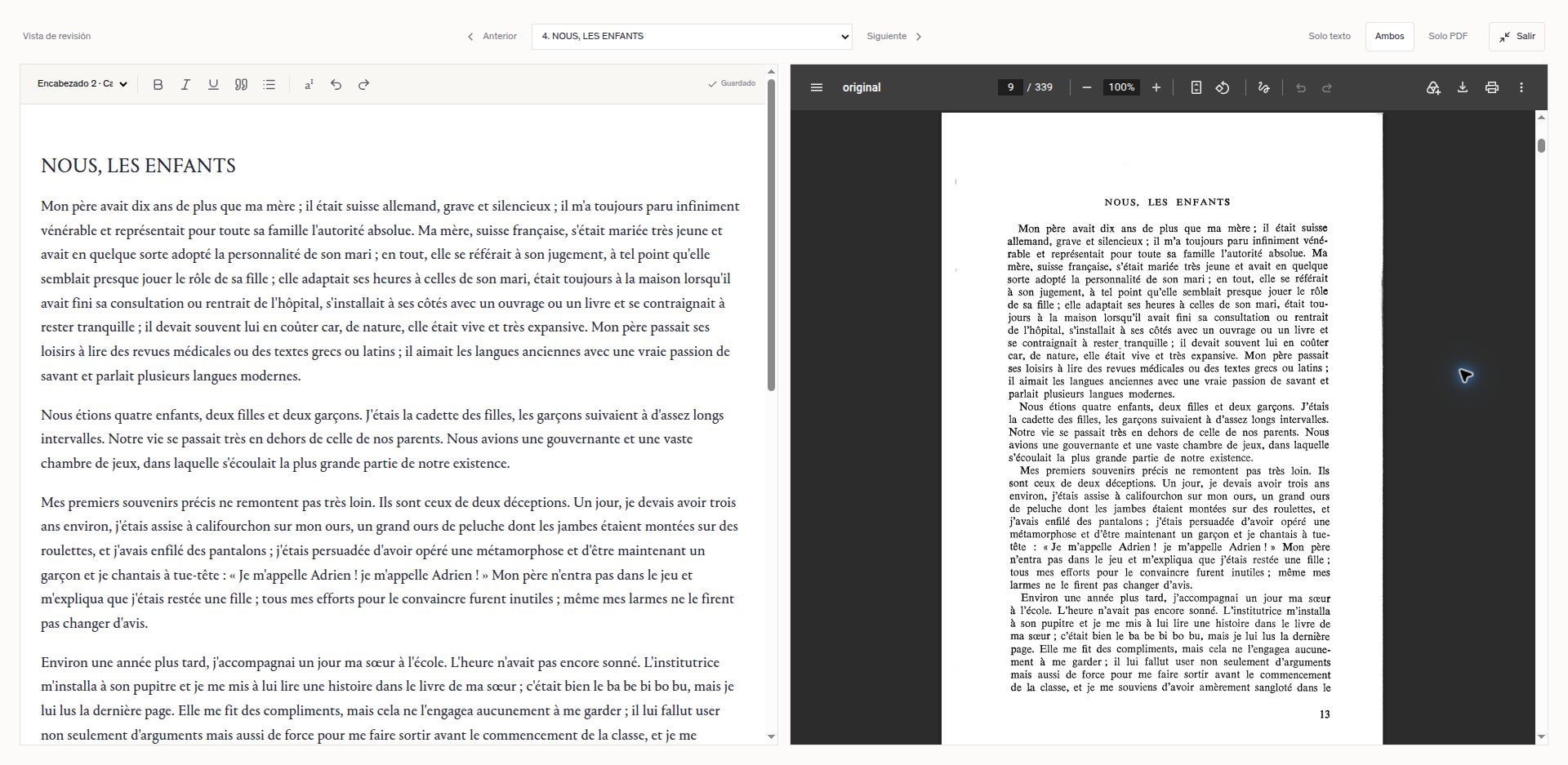 Enlarge screenshot ↗
Technology transcribes and reconstructs. Editors focus their attention on the review that matters.
What about your organisation?
This project demonstrates a capability we can adapt to your organisation. Let’s explore how your knowledge can help users and become new services, licences or editions, with less repetitive work.



You have the knowledge.
Let’s take it further.
New uses for your content, more time for your team and opportunities to earn revenue.