


MCP: from your works to AI agents.
OCR for scanned PDFs and structured extraction from digital works: chapters, paragraphs, footnotes and references that AI agents can query through MCP.
A collection turned into structured content available to agents: retrieve passages, follow references and prepare answers that can be checked against the works.
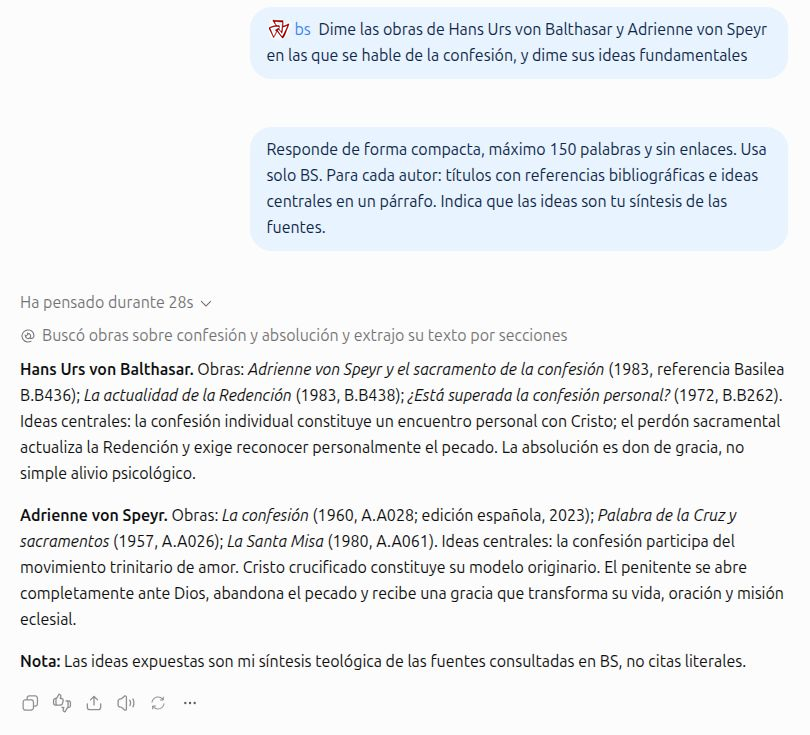 Enlarge screenshot ↗
Real Spanish query about confession: the BS MCP supplies Balthasar & Speyr’s works and sources; ChatGPT synthesises their ideas. A compact answer was requested, not literal quotations. Screenshot cropped without account details; broken icon replaced with the Balthasar & Speyr logo.
Less transcription and manual searching. More time to review sources and find new uses for knowledge.
OCR, structure and access through MCP.
Digital works in EPUB or PDF and their bibliographic records. When a PDF contains scanned pages, OCR is applied and the text is checked against the original.
Balthasar & SpeyrEPUB / text PDF / scanned PDF
Recovered text + source page
OCR for scanned pages; digital text when available.
Read sources and apply OCR to scanned PDFs
Digital works supply their text. When a PDF contains page images, OCR recovers the text while retaining the source page.
Balthasar & SpeyrText + headings + footnote markers
Work → chapter → paragraph → footnote
Each block retains its reference.
Extract chapters, paragraphs, footnotes and references
Chapters, paragraphs and footnotes are reconstructed, linking each block to the work, edition and location. Fragments can be retrieved without losing context.
Balthasar & SpeyrOriginal document ↔ extracted content
Reviewed content with references
Technology proposes; people check.
Review content and retain its source
Uncertain readings are checked against the document. Corrections and uncertainty remain distinct from original text and generated analysis.
Balthasar & SpeyrStructured content + references
MCP tools for retrieving sources
Work / edition / chapter / location
Balthasar & SpeyrQuestion → query to MCP tools
Agent response + references
Retrieved source ≠ agent synthesis
Content queried by an agent
The query in this demonstration
Dime las obras de Hans Urs von Balthasar y Adrienne von Speyr en las que se hable de la confesión, y dime sus ideas fundamentalesBalthasar & SpeyrQuery about confession
Sources: La confesión (A.A028), by Speyr; Adrienne von Speyr y el sacramento de la confesión (B.B436), by Balthasar.
Real query · assistant synthesis distinguished from sources
BS supplies the information
ChatGPT queries the BS MCP. The connector returns catalogue records and available texts: works, authors, bibliographic references and passages for studying confession.
Balthasar & SpeyrRecords and sources retrieved by BS
Retrieved information is the foundation; the synthesis is the assistant’s interpretation.
Real query · assistant synthesis distinguished from sources
ChatGPT reasons with the sources
The assistant selects relevant works, relates their ideas and prepares a synthesis: openness before God, reconciliation in Christ and the ecclesial dimension. ChatGPT develops this interpretation from the retrieved information.
Balthasar & SpeyrResult: an explained thematic query connected to its sources.
Real query · assistant synthesis distinguished from sources
The answer leads back to the works
The reader receives titles, fundamental ideas and references. They can distinguish a summary from a literal quotation and request passages or edition details to explore further.
MCP connects the assistant to sources. BS retrieves information; ChatGPT interprets and presents it. The screenshot shows a concise answer, not an exhaustive search through every work or a literal transcription.
From finding words
to following ideas.
Authors, works, concepts and quotations form a knowledge graph linked to passages documenting each relationship. Conceptual, literal and multilingual search helps explore the collection. Researchers can return to the context and original page, distinguishing sources from analysis.
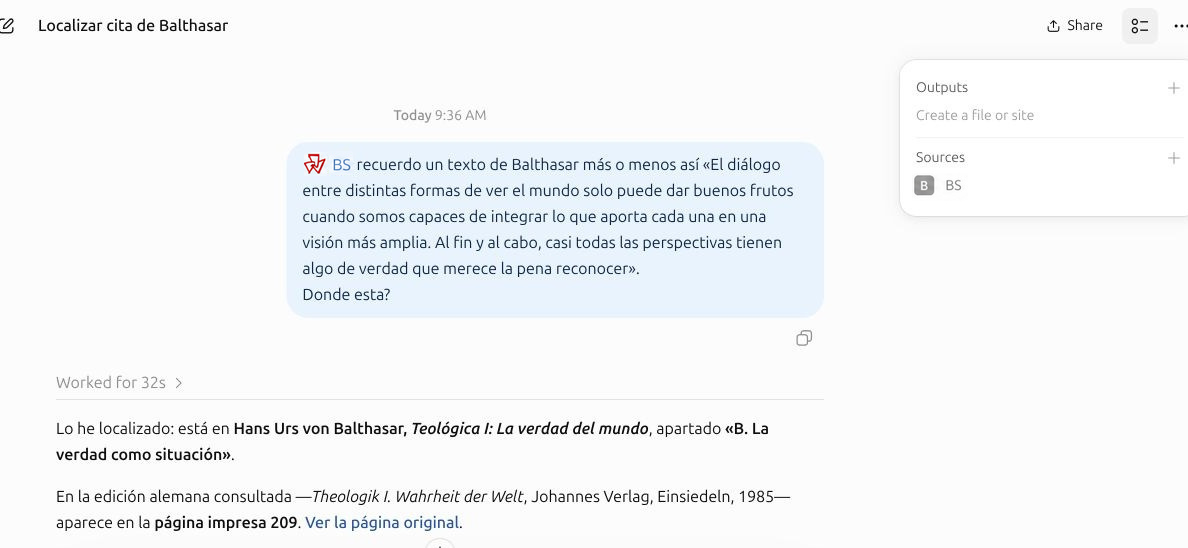
«Find passages where two authors discuss the same concept and show the references.»
Example query, subject to the collection’s coverage.«Find the chapters that quote or discuss a work and retrieve the context.»
Example query, subject to the collection’s coverage.«Gather commentary on a biblical passage, with its location and edition.»
Example query, subject to the collection’s coverage.Encyclopaedias and libraries
The same approach can be adapted to other collections, with their own content, coverage and access permissions.
Encyclopaedias: from an entry to its sources
Connecting entries, concepts, authors and bibliographies lets readers explore a topic and locate supporting passages. Editorial teams can check references when revising or expanding an entry.
Libraries: from the record to the content
Beyond finding a title or edition, users can ask about an idea and locate passages within available works. Scanned collections can be incorporated through OCR and review, retaining document and page references.
What about your organisation?
This project demonstrates a capability we can adapt to your organisation. Let’s explore how your knowledge can help users and become new services, licences or editions, with less repetitive work.
Create value.
Build a business.
Useful services for your users. New revenue for your organisation. Less production time and cost. Let’s design your next solution.